
 Indonesia
Sahabat Insurance CSR program with AAUI in Bali
Terakhir Diubah : 12:51:45 - Friday, 05 December 2025
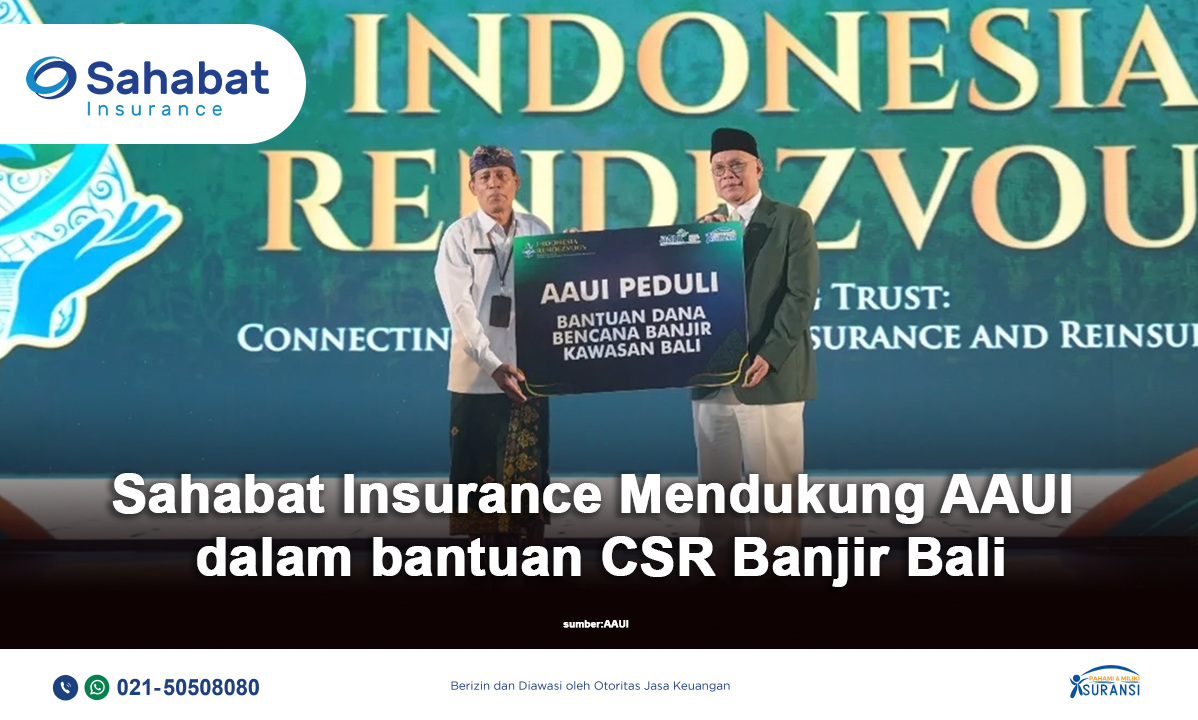
Sahabat Insurance support The Indonesian General Insurance Association (AAUI) provided IDR 100 million in assistance to the Provincial Government of Bali to support communities affected by recent flooding. The funds were collected through donations from AAUI member companies and distributed through the association’s official mechanism.
This social initiative reflects the industry’s commitment to post-disaster recovery, demonstrating that the role of general insurance extends beyond financial protection to active humanitarian support. AAUI also expressed its appreciation to all member companies for their solidarity and collaboration in helping the affected communities recover from the disaster
Berita Lainnya
Fitch Assigns Sahabat Insurance First-Time National IFS Rating of A(idn)
Fitch Ratings - Jakarta - 12 Mar 2026: Fitch Ratings Indonesia has assigned PT Asuransi Sahabat Artha Proteksi (Sahabat Insurance) a National Insurer Financial Strength (IFS) Rating of 'A(idn)'. The Outlook is Stable.
The rating reflects a 'Moderate' company profile and stable profitability, which are offset by its lower regulatory capital ratio than peers. The rating also reflects a conservative investment approach and domestic reinsurance coverage.
'A' National IFS ratings denote a strong capacity to meet policyholder obligations relative to all other obligations or issuers in the same country or monetary union, across all industries and obligation types
KEY RATING DRIVERS
'Moderate' Company Profile: Fitch assesses Sahabat Insurance's profile based on a 'Moderate' business profile and 'Neutral' corporate governance compared with other domestic insurers. The insurer, established in 1996, was known as PT Bess Central Insurance from 2011, and changed its name to Sahabat Insurance in 2020. Sahabat Insurance's market share is small, with 0.5% of gross premiums written (GPW) in the Indonesian non-life industry in 2024.
Sahabat Insurance's main businesses are motor insurance, at 76% of total GPW in 2025, and property at 10%. It mostly sources business from leasing companies (66%), followed by brokers (13%) and the direct channel (13%).
Lower Regulatory Capital Ratio: Sahabat Insurance's regulatory risk-based capital ratio fell to 188% by end-2025 from 203% at end-2024, driven by a rise in premium reserves due to premium growth. This was well below the industry average of above 300%. Equity capital rose on surplus growth, to IDR345 billion from IDR296 billion. It estimates that the implementation of the new accounting standard PSAK 117, the local equivalent of IFRS 17, will lower equity, which would remain above the new equity requirement of IDR250 billion in 2026.
Stable Operating Performance: Operating performance has been stable over the past three years. The insurer booked 7% GPW growth in 2025, after an 8% decline in 2024. Nonetheless, it has maintained an underwriting profit for at least the past three years. The 'combined ratio' increased slightly to 96% in 2025, from 93% in 2024, due to higher premium reserves arising from premium growth in motor and fire. The three-year average combined ratio was 94% over 2023-2025.
Net income rose to IDR48 billion in 2025, from IDR38 billion in 2024, on higher investment income following a shift in its investment mix. Return on equity increased to 15% in 2025 (2024: 14%), which was high relative to peers, with a three-year average of 14% over 2023-2025.
Conservative Investment Portfolio: The investment portfolio is conservative and liquid, with around 74% of total invested assets placed in cash and time deposits, followed by fixed-income securities of 25% and a small portion of stock. Fixed-income securities comprise only government bonds, after the insurer shifted its investment allocation from mutual funds in 2025. Exposure to 'risky assets' is kept at a manageable level relative to equity.
Domestic Reinsurers Dominate: Sahabat Insurance cedes a portion of its premiums through proportional, non-proportional and excess-of-loss reinsurance treaties to mitigate catastrophe risks. Its reinsurance treaties are primarily with domestic reinsurers. Exposure of the capital base to reinsurance recoverables was low compared with peers, at 37% at end-2025. The premium retention ratio - net premiums written to GPW - was high, at 81% (2024: 85%), as it retains most of the premiums from its motor vehicle business.
RATING SENSITIVITIES
Factors that Could, Individually or Collectively, Lead to Negative Rating Action/Downgrade
- Weakening capitalisation, with regulatory risk-based capital ratio persistently below 180%.
- Deterioration in financial performance, with the combined ratio above 105%.
Factors that Could, Individually or Collectively, Lead to Positive Rating Action/Upgrade
- Stronger capitalisation, with regulatory risk-based capital ratio persistently above 250%.
- Consistent improvement in the company profile, including a larger market franchise and diversification of business lines.
DATE OF RELEVANT COMMITTEE
04 March 2026
REFERENCES FOR SUBSTANTIALLY MATERIAL SOURCE CITED AS KEY DRIVER OF RATING
The principal sources of information used in the analysis are described in the Applicable Criteria.
Source: https://www.fitchratings.com/research/insurance/fitch-assigns-sahabat-insurance-first-time-national-ifs-rating-of-a-idn-outlook-stable-12-03-2026